
Free · Windows 10 & 11 · No sign-up
Free DICOM Burner — No License Fees
Free DICOM burner software for medical professionals. Query PACS servers, burn DICOM studies to CD/DVD, and copy to USB drives — with a DICOM viewer on every disc. 100% free, no licensing fees.
Why Choose Our Free DICOM Burner Software?
Everything you need for professional DICOM study management, PACS query, and media creation with our free DICOM burning software
Query Multiple PACS at Once
Run one search across every configured PACS server in parallel — results merge into a single grid, and one unreachable server never blocks the rest from responding.
Advanced Query (C-FIND)
Query PACS servers by patient name, modality, and date ranges. Supports wildcards and flexible search criteria.
Smart Retrieve (C-MOVE/C-GET)
Automatic failsafe. Download for both data archiving and format-restricted environments.
Concurrent Operations
Support for simultaneous operations. Multiple users can process studies concurrently.
Organized Storage
Hierarchical folder structure. Patient/study/series organization for maximum compatibility.
DICOM Generation
Automatic DICOMDIR creation for CD/DVD burning. Fully compliant with DICOM Part 10 specifications.
How it works
Burn DICOM Studies to Disc or USB in Four Steps
DICOM Burner takes you from a PACS query to a finished disc, USB drive, or ISO in a single, guided workflow.
Add your PACS server
Enter the host, port, and AE titles for each PACS/DICOM server, then confirm it's reachable with a one-click C-ECHO test.
Search for studies
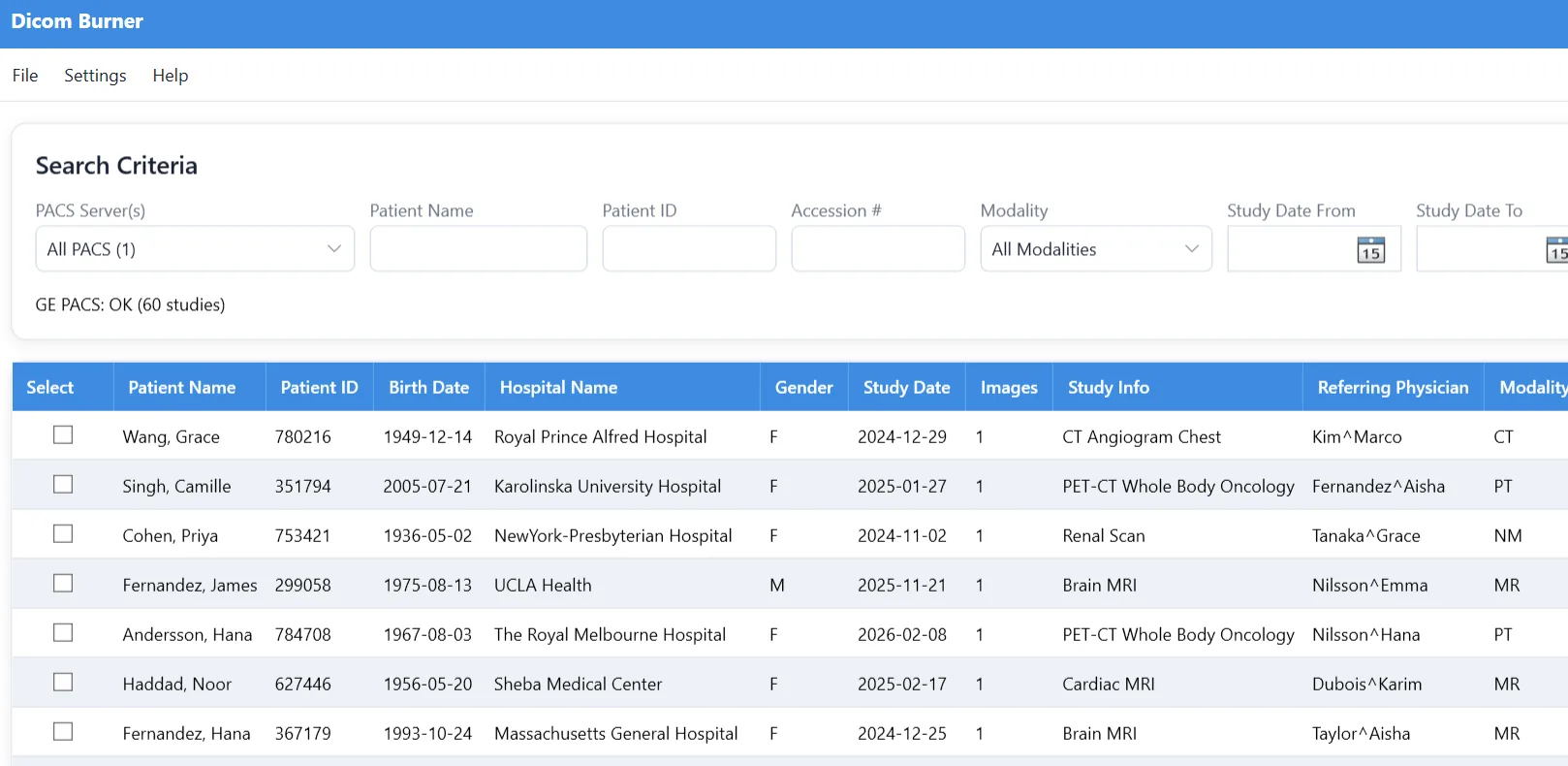
Query by patient name, ID, modality, or date range. DICOM Burner sends a C-FIND and lists every matching study.
Retrieve the study
Pull the studies down via C-MOVE or C-GET, whichever your PACS is configured to use, into your local library.
Burn, copy, or export
Write to CD/DVD, copy to USB, or save as an ISO — each with a portable DICOM viewer bundled on the media.
Technical details
Technical Specifications
Comprehensive technical details and system requirements for optimal performance
System Requirements
DICOM Protocols
Supported Media
File Formats
Who Uses DICOM Burner?
A free DICOM burning tool built for anyone who needs to get medical imaging studies off a PACS and into someone's hands.
Radiology departments
Pull studies from the department PACS and burn patient copies or referral discs on demand, without tying up an expensive commercial license per workstation.
Imaging centers
Hand patients a CD, DVD, or USB drive of their own scans before they leave, complete with a viewer so they can open the images on any Windows PC.
Referring physicians
Distribute studies to specialists and outside offices on standard media that opens in any DICOM viewer, following DICOM Part 10 with a proper DICOMDIR index.
IT & PACS administrators
Deploy a free, standards-based query/retrieve and burning tool that speaks C-FIND, C-MOVE, and C-GET and works with any compliant PACS.
DICOM Burner vs. Paid DICOM CD Burners
Most DICOM CD/DVD burning software is sold as a paid license with a limited trial. DICOM Burner gives you the core query, retrieve, and burning workflow free, forever.
No license fee, no subscription, no trial countdown — not just a limited free edition.
Install it on every workstation that needs it without counting licenses.
Discs and USB copies you create are clean, with a bundled viewer and full-fidelity images.
Frequently Asked Questions
Common questions about the free DICOM burner software.
Is DICOM Burner really free?
Yes. DICOM Burner is 100% free to download and use, for personal or commercial purposes, with no license fee, subscription, trial period, or per-seat cost. There is no paywalled feature tier and no watermark on burned discs.
How do I burn DICOM images to a CD or DVD?
Search your PACS server for the study, tick it in the results grid, choose your disc burner under Optical Drive, and click Burn to DVD. DICOM Burner retrieves the study and writes it to the disc with an automatically generated DICOMDIR index so it opens in standard DICOM viewers.
Can I copy DICOM studies to a USB drive instead of burning a disc?
Yes. Plug in a USB drive, select it under USB Drive, and click Export to USB. DICOM Burner retrieves the selected study from PACS and copies it straight to the drive in one step -- no disc burner required.
Does DICOM Burner work with my PACS server?
DICOM Burner uses standard DICOM networking (C-ECHO, C-FIND, C-MOVE, and C-GET), so it works with any standards-compliant PACS. You configure each server's host, port, and AE titles, and can test the connection with a C-ECHO before saving. Both C-MOVE and C-GET retrieval are supported for compatibility with older and stricter PACS systems.
Do the people I give the disc or USB drive to need to install software?
No. You can bundle a portable DICOM viewer onto every disc or USB drive, so recipients can open and view the images immediately without installing anything themselves.
Is DICOM Burner HIPAA compliant?
DICOM Burner runs entirely on your own computer and transmits no patient data to us -- all DICOM traffic stays between the app and the PACS servers you configure. Compliance with HIPAA or equivalent regulations remains the responsibility of you and your organization, based on how you handle, store, and distribute the media you create.
What Windows versions does DICOM Burner support?
DICOM Burner runs on 64-bit Windows 10 and Windows 11, and requires the .NET 7.0 runtime (the installer prompts to install it if needed).
Can I save a study as an ISO file to burn later?
Yes. DICOM Burner can retrieve a study straight into an .iso disc image with no physical burner attached, which you can archive, distribute over the network, or burn later on different hardware.
Support & Documentation
Get help and learn how to make the most of DICOM Burner